Heroku
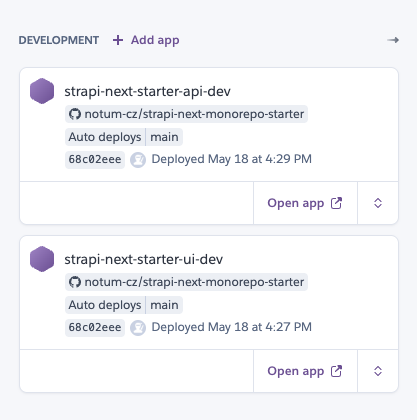
Heroku is an optional deployment target for this starter. The usual setup is two Heroku apps: one for Strapi and one for the Next.js UI.
If the project does not deploy to Heroku, remove Heroku-specific files such as Procfiles and ignore the buildpack guidance on this page.
Recommended App Layout
| Heroku app | Workspace | Runtime |
|---|---|---|
| Strapi app | @repo/strapi | CMS API and admin panel |
| UI app | @repo/ui | Next.js frontend |
Use the heroku-24 stack or newer for both apps. Connect both apps to the GitHub repository from the Heroku Deploy tab and configure automatic deploys from the branch that matches the environment.
Buildpacks
This monorepo can use Notum buildpacks to make Heroku builds smaller and faster:
| Buildpack | Purpose |
|---|---|
| Turbo Prune | Prunes the monorepo to the selected workspace before the Node build. |
| Next Standalone Slim | Adapts Next.js standalone output for a smaller Heroku runtime. |
| Heroku Node.js | Official Node.js buildpack. |
heroku-buildpack-turbo-prune prunes the monorepo to the selected workspace before the Node build. The Next standalone buildpack is only for the UI app when NEXT_OUTPUT=standalone.
Heroku runs buildpacks in order. Put them in the recommended order to ensure the monorepo is pruned before the Node build.
Strapi App
Set these Heroku config vars:
APP=strapi
WORKSPACE=@repo/strapi
Also configure the required Strapi environment variables from apps/strapi/.env.example. See Strapi Environment Variables.
Recommended buildpack order:
Attach Heroku Postgres. Heroku sets DATABASE_URL automatically, and the Strapi database config prefers DATABASE_URL over individual database variables.
Strapi Setup Helper (using Heroku CLI)
Use this helper as a starting point for configuring a Strapi Heroku app. It sets the common buildpacks, creates the Heroku Postgres add-on, generates Strapi secrets, and optionally sets the frontend URL.
This script changes Heroku buildpacks, creates a paid or billable add-on depending on your Heroku account plan, and writes production config vars. Review the optional variables before running it.
#!/usr/bin/env bash
set -euo pipefail

# Script to set the most common Strapi environment vars and buildpacks for Heroku deployment.
#
# Usage:
#   bash set-strapi-heroku-app.sh <app-name> [<client-app-url>]
#
# Example:
#   bash set-strapi-heroku-app.sh fancy-api https://frontend.herokuapp.com

app_name="${1:?Missing Heroku app name}"
client_app_url="${2:-}"

# Buildpacks
heroku buildpacks:set https://github.com/notum-cz/heroku-buildpack-turbo-prune.git -a "$app_name"
heroku buildpacks:add --index 2 heroku/nodejs -a "$app_name"

# Heroku Postgres
heroku addons:create heroku-postgresql:essential-0 -a "$app_name"

# Get public URL of the app without trailing slash.
app_url=$(heroku info -a "$app_name" -s | grep web_url | cut -d= -f2 | sed 's/\/$//')

# Required variables for buildpacks
heroku config:set -a "$app_name" APP=strapi
heroku config:set -a "$app_name" WORKSPACE="@repo/strapi"
# This version must match the version of Turbo used in the monorepo
heroku config:set -a "$app_name" TURBO_VERSION=2.9.18

# Required variables for Strapi
# https://docs.strapi.io/cms/deployment/heroku#populate-the-environment-variables
heroku config:set -a "$app_name" APP_KEYS="$(openssl rand -base64 32)"
heroku config:set -a "$app_name" API_TOKEN_SALT="$(openssl rand -base64 32)"
heroku config:set -a "$app_name" ADMIN_JWT_SECRET="$(openssl rand -base64 32)"
heroku config:set -a "$app_name" JWT_SECRET="$(openssl rand -base64 32)"
heroku config:set -a "$app_name" TRANSFER_TOKEN_SALT="$(openssl rand -base64 32)"
heroku config:set -a "$app_name" APP_URL="$app_url"

# Database connection variables - using default values for Heroku Postgres
heroku config:set -a "$app_name" DATABASE_SSL=true
heroku config:set -a "$app_name" DATABASE_SSL_REJECT_UNAUTHORIZED=false

# Rest of the variables
heroku config:set -a "$app_name" TZ=Europe/Prague
heroku config:set -a "$app_name" NODE_ENV=production
heroku config:set -a "$app_name" STRAPI_REVALIDATE_SECRET="$(openssl rand -base64 32)"

# Optional - uncomment when needed
# heroku config:set -a "$app_name" STRAPI_PREVIEW_ENABLED=true
# heroku config:set -a "$app_name" STRAPI_PREVIEW_SECRET="$(openssl rand -base64 32)"
# heroku config:set -a "$app_name" STRAPI_CDN_PURGE_SECRET="$(openssl rand -base64 32)"
# heroku config:set -a "$app_name" AUTO_SEED_ENABLED=true
# heroku config:set -a "$app_name" AUTO_SEED_MODE=empty

# Optionally set the client app URL, e.g. for forgot-password emails,
# confirmation emails, and links from Strapi to the UI.
if [ -n "$client_app_url" ]; then
  heroku config:set -a "$app_name" CLIENT_URL="$client_app_url"
fi
Heroku dyno filesystems are ephemeral. Use S3, Azure Blob Storage, or another external upload provider for Strapi media. Uploaded files stored on the dyno can disappear after restarts, rebuilds, or dyno moves.
The repository currently includes apps/strapi/Procfile:
web: cd apps/strapi && node scripts/seed-runner.mjs start
This starts Strapi through the seed runner. Configure seed-related variables intentionally for each environment.
If the dyno hits memory limits during startup seeding, increase the dyno size or disable automatic seeding. Then run the import manually by opening a Heroku dyno shell with heroku run bash and running pnpm run seed:import.
UI App
Set these Heroku config vars:
APP=ui
WORKSPACE=@repo/ui
NEXT_OUTPUT=standalone
Also configure the required UI environment variables from apps/ui/.env.local.example. See UI Environment Variables.
Recommended buildpack order:
NEXT_OUTPUT=standalone tells Next.js to produce a smaller self-contained server build. The standalone slim buildpack adapts that output for Heroku.
UI Setup Helper (using Heroku CLI)
Use this helper as a starting point for configuring a Next.js UI Heroku app. It sets the common buildpacks, configures standalone output, sets the public app URL, and optionally points the UI to the Strapi app.
This script changes Heroku buildpacks and writes app config vars. Review environment-specific values such as APP_ENV, preview secrets, debug flags, and Sentry settings before running it.
#!/usr/bin/env bash
set -euo pipefail

# Script to set the most common Next.js environment vars and buildpacks for Heroku deployment.
#
# Usage:
#   bash set-nextjs-heroku-app.sh <app-name> [<api-app-url>]
#
# Example:
#   bash set-nextjs-heroku-app.sh fancy-app https://backend.herokuapp.com

app_name="${1:?Missing Heroku app name}"
api_app_url="${2:-}"

# Buildpacks
heroku buildpacks:set https://github.com/notum-cz/heroku-buildpack-turbo-prune.git -a "$app_name"
heroku buildpacks:add --index 2 heroku/nodejs -a "$app_name"
heroku buildpacks:add --index 3 https://github.com/notum-cz/heroku-buildpack-next-standalone-slim.git -a "$app_name"

# Get public URL of the app without trailing slash.
app_url=$(heroku info -a "$app_name" -s | grep web_url | cut -d= -f2 | sed 's/\/$//')

# Required variables for buildpacks
heroku config:set -a "$app_name" APP=ui
heroku config:set -a "$app_name" WORKSPACE="@repo/ui"
heroku config:set -a "$app_name" NEXT_OUTPUT=standalone
# This version must match the version of Turbo used in the monorepo
heroku config:set -a "$app_name" TURBO_VERSION=2.9.18

# Required variables for Better Auth, if used
# heroku config:set -a "$app_name" BETTER_AUTH_SECRET="$(openssl rand -base64 32)"

# Rest of the variables
heroku config:set -a "$app_name" APP_PUBLIC_URL="$app_url"
heroku config:set -a "$app_name" APP_ENV=testing
heroku config:set -a "$app_name" TZ=Europe/Prague
heroku config:set -a "$app_name" SENTRY_SUPPRESS_GLOBAL_ERROR_HANDLER_FILE_WARNING=1
heroku config:set -a "$app_name" SHOW_NON_BLOCKING_ERRORS=true
heroku config:set -a "$app_name" DEBUG_STATIC_PARAMS_GENERATION=true
heroku config:set -a "$app_name" DEBUG_STRAPI_CLIENT_API_CALLS=false

# Optional - uncomment when needed
# heroku config:set -a "$app_name" NEXT_PUBLIC_PREVENT_UNUSED_FUNCTIONS_ERROR_LOGS=true
# heroku config:set -a "$app_name" STRAPI_PREVIEW_SECRET=this-has-to-be-same-as-in-strapi
# heroku config:set -a "$app_name" STRAPI_REVALIDATE_SECRET=this-has-to-be-same-as-in-strapi
# heroku config:set -a "$app_name" STRAPI_CDN_PURGE_SECRET=this-has-to-be-same-as-in-strapi

# Optionally set the backend app URL.
if [ -n "$api_app_url" ]; then
  heroku config:set -a "$app_name" STRAPI_URL="$api_app_url"
fi
Environment Variables
Use separate config vars per Heroku app. Do not copy Strapi-only secrets to the UI app unless the UI runtime actually needs them.
Common cross-app values:
| Variable | App | Purpose |
|---|---|---|
APP_PUBLIC_URL | UI | Public URL for auth callbacks and generated links. |
STRAPI_URL | UI | Server-side URL the UI uses to reach Strapi. |
CLIENT_URL | Strapi | Frontend URL for preview and admin links. |
DATABASE_URL | Strapi | Managed PostgreSQL connection string. |
Deployment Flow
- Create the Strapi Heroku app and attach Heroku Postgres.
- Configure Strapi config vars and buildpacks.
- Deploy Strapi and verify the admin panel.
- Configure upload storage before accepting production media.
- Create the UI Heroku app.
- Configure UI config vars and buildpacks.
- Deploy the UI app.
- Run the QA workflow against the UI app URL.